Work sample · Independent project
A project management toolkit built for any project
- Scope
- 89 project templates and 6 organizational standards, from first request to benefits review
- My role
- Designer and author, accountable for the structure, standards, and final quality of every template
- Basis
- PMBOK® Guide, Eighth Edition
- Format
- Fillable PDFs, plus 9 Excel workbooks for the templates that calculate
- Status
- Complete, 2026, and ready to tailor to each new project
In short
I built a complete project management toolkit: 89 templates and 6 organizational standards that cover a project from the first request to the benefits review after close. Each template is a building block, designed to be tailored to predictive, Agile, or hybrid delivery, or folded into the guides and project management software a team already uses. Every template includes plain-language guidance and a completed example, so a new project manager can pick it up and use it on day one. It also scales: a small project needs only the 17-template essential kit, not all 89.
The situation
Why I built it
Organizations manage projects in different ways. Some work inside project management software, others in shared drives and spreadsheets, and many in a mix of both. I wanted a foundation that could sit alongside any of them.
As I prepared for my next project management role, I set out to build a standard set of tools I could bring to any team from my first week. It had to follow the current PMBOK® Guide, flex to any delivery approach, and be simple enough for people who aren't project managers to use.
It was never meant to be used all at once. Each template is a starting point. Some will be adopted as written, some reshaped to fit a team's existing tools, and some set aside where a company's software already covers that step.
My role
What I owned
The library is my design from end to end. AI served as a drafting partner; the judgment calls, and the final sign-off on every page, were mine.
Structure and standards
The lifecycle structure, the numbering and naming rules, the tiers, and the visual standard are all mine, so every template looks and works the same way.
Content and examples
Each template exists to answer a specific need, and its guidance reflects how teams actually use it, not how a textbook describes it. A worked example closes every template.
Quality and accuracy
Every term traces back to its PMI source. Terms PMI doesn't define are labeled as common practice, and a plain-language glossary explains them all.
What I did
Key decisions
Scale to the project, not the template count
Every template is tiered: Essential, Standard, or Situational. A two-month internal project is covered by the 17-template essential kit. A large or regulated project adds what its risk calls for.
One template for any approach
Where predictive and Agile work differ, the template carries a labeled section instead of becoming a second file. Separate templates exist only where the approaches truly differ, like a work breakdown structure versus a product backlog.
Governance set by project size
Projects are classed Small, Medium, or Large. The class decides the minimum approvals and paperwork, so small projects aren't buried in process and large ones aren't under-controlled.
One project, start to finish
Every completed example follows the same fictional project: a marketing agency launching a client onboarding portal, delivered as a hybrid project. Reviewers see how the documents connect, not just what each one looks like.
Plain language, sourced terms
Each template has short guidance and a quality check under every section. PMI terms are cited to their source, so every definition stands on solid ground.
The library
Inside the library
The library follows the project lifecycle in seven stages, with five sponsor decision points along the way: charter, baseline, mid-delivery, go-live, and closure.
| Stage | The question it answers | Templates |
|---|---|---|
| 0 · Business justification | Is this worth doing? | 8 |
| 1 · Initiating | Are we authorized and aligned? | 9 |
| 2 · Planning | How will the work get done? | 43 |
| 3 · Executing | Is the team delivering? | 9 |
| 4 · Monitoring and controlling | Are we on track, and what needs correcting? | 13 |
| 5 · Closing | Is the work accepted and handed over? | 5 |
| 6 · Benefits realization | Did it deliver the value we expected? | 2 |
| Organizational standards | What standards does every project follow? | 6 |
View the library index (PDF) View the lifecycle playbook (PDF)
Work sample
A look inside
Fourteen samples follow one project from setup to control.
1 · Set up for success
Before any work starts: the approach, the authority, and who owns what.
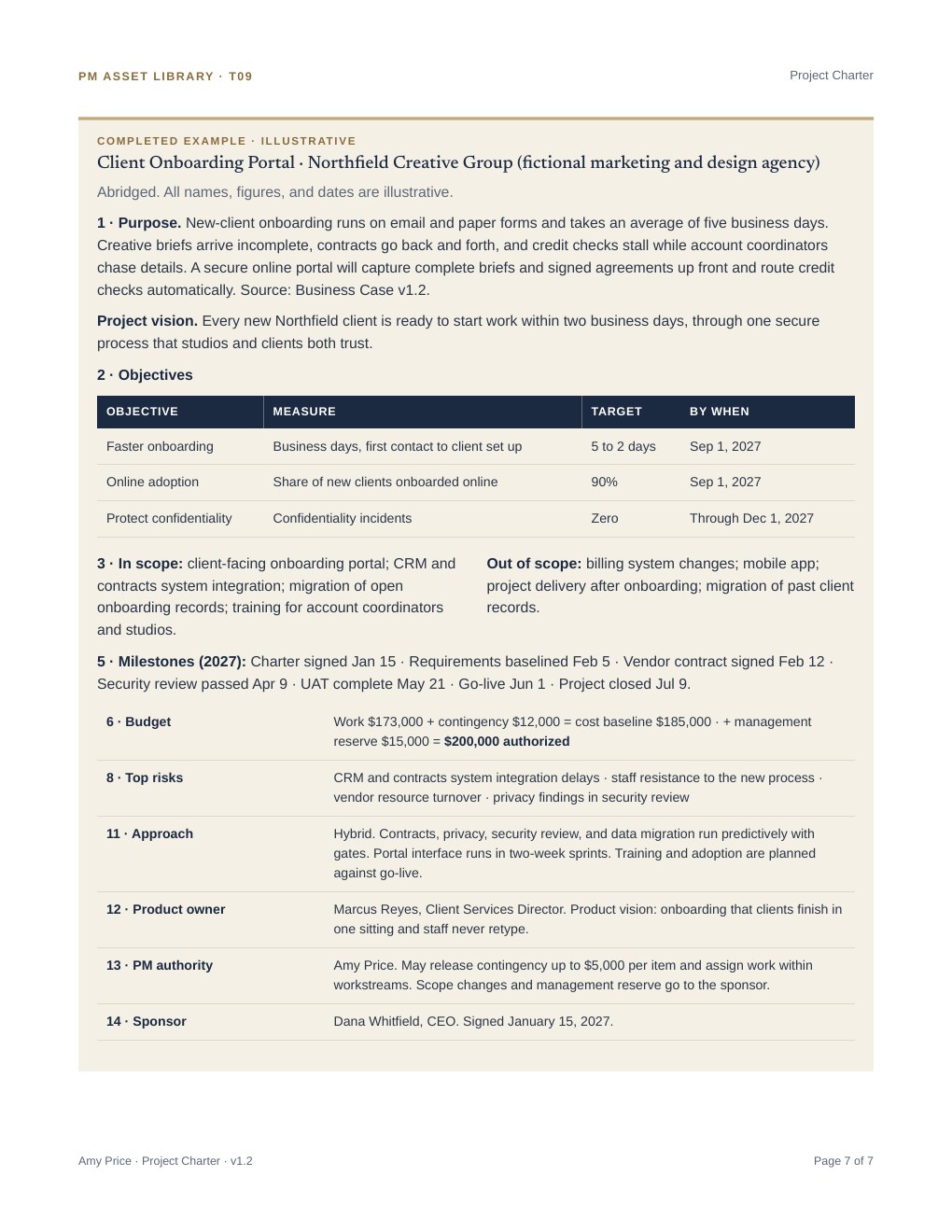
- Approach Selection & Tailoring Worksheet (PDF)How the team chooses predictive, Agile, or hybrid delivery, and records why.
- RACI Matrix (PDF)Who does, owns, advises on, and hears about each piece of work, with one accountable person per task.
2 · Plan the work
One integrated plan, broken down into work, time, money, people, and releases.
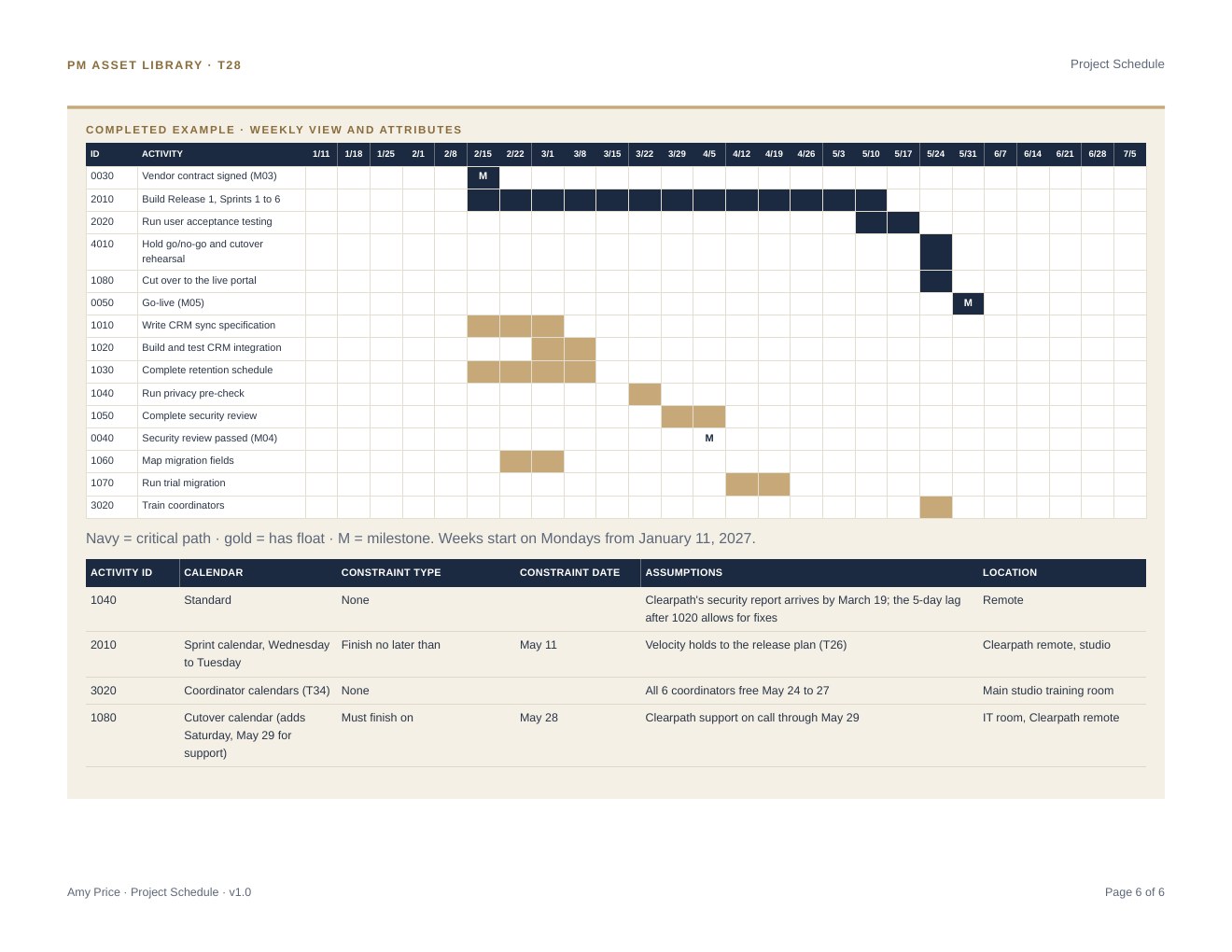
- Project Management Plan (PDF)How scope, schedule, cost, and risk come together into one approved baseline.
- WBS & WBS Dictionary (PDF)The full scope broken into work packages, each defined so nothing falls through the cracks.
- Cost Estimate & Budget Workbook (PDF)Costs estimated and rolled up into the budget. The companion Excel workbook is available on request.
- Resource Calendar & Capacity Plan (PDF)Team demand compared with real availability, week by week. The companion Excel workbook is available on request.
3 · Deliver
Keeping the work moving: sprints, new team members, and a safe go-live.
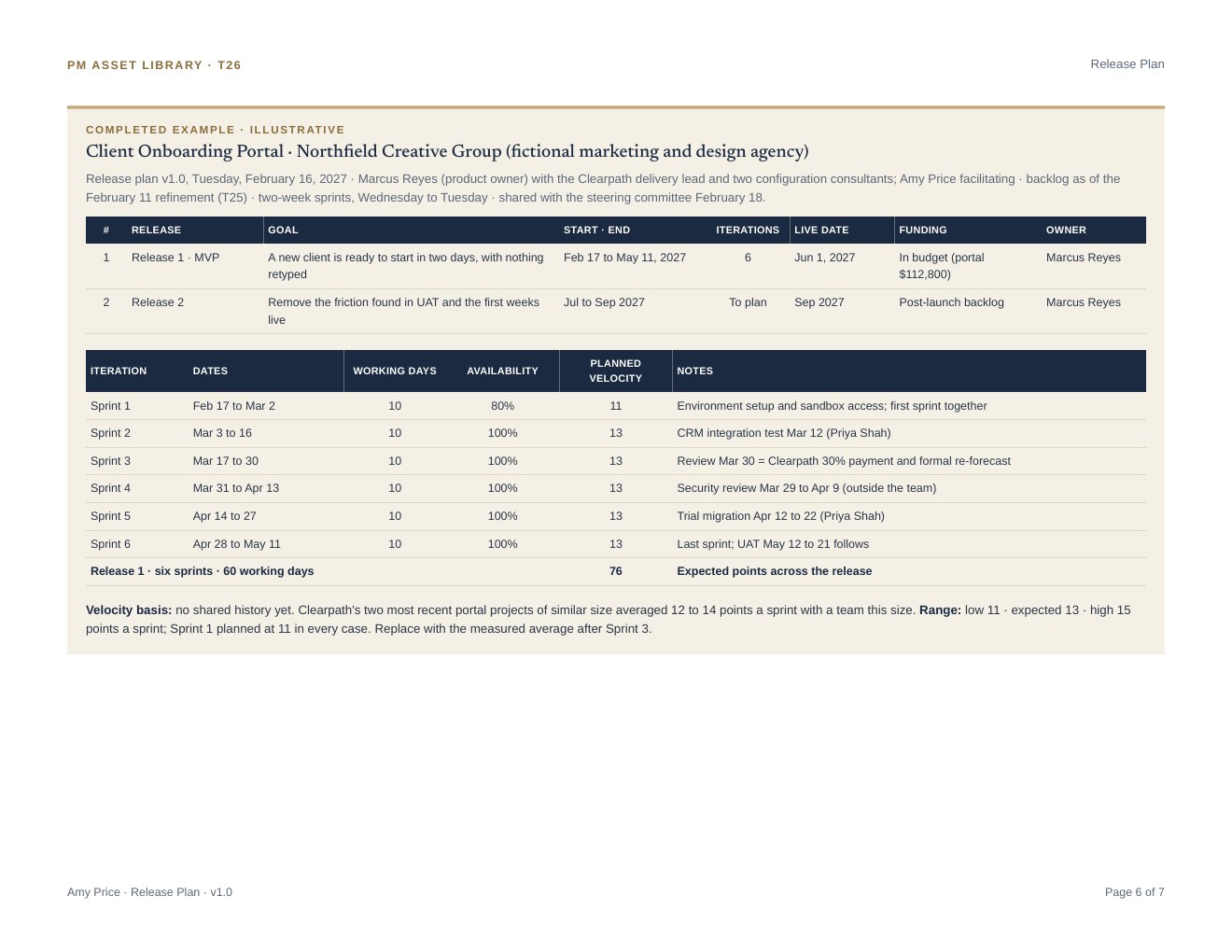
- Iteration Plan & Review (PDF)How each two-week sprint is planned, reviewed, and adjusted.
- Team Onboarding Plan (PDF)A 30-day plan that takes a new team member from shadowing to contributing.
- Transition & Rollout Plan (PDF)Cutover, support, hypercare, and the go/no-go decision.
4 · Stay in control
Keeping leadership informed and risks in front of the team.
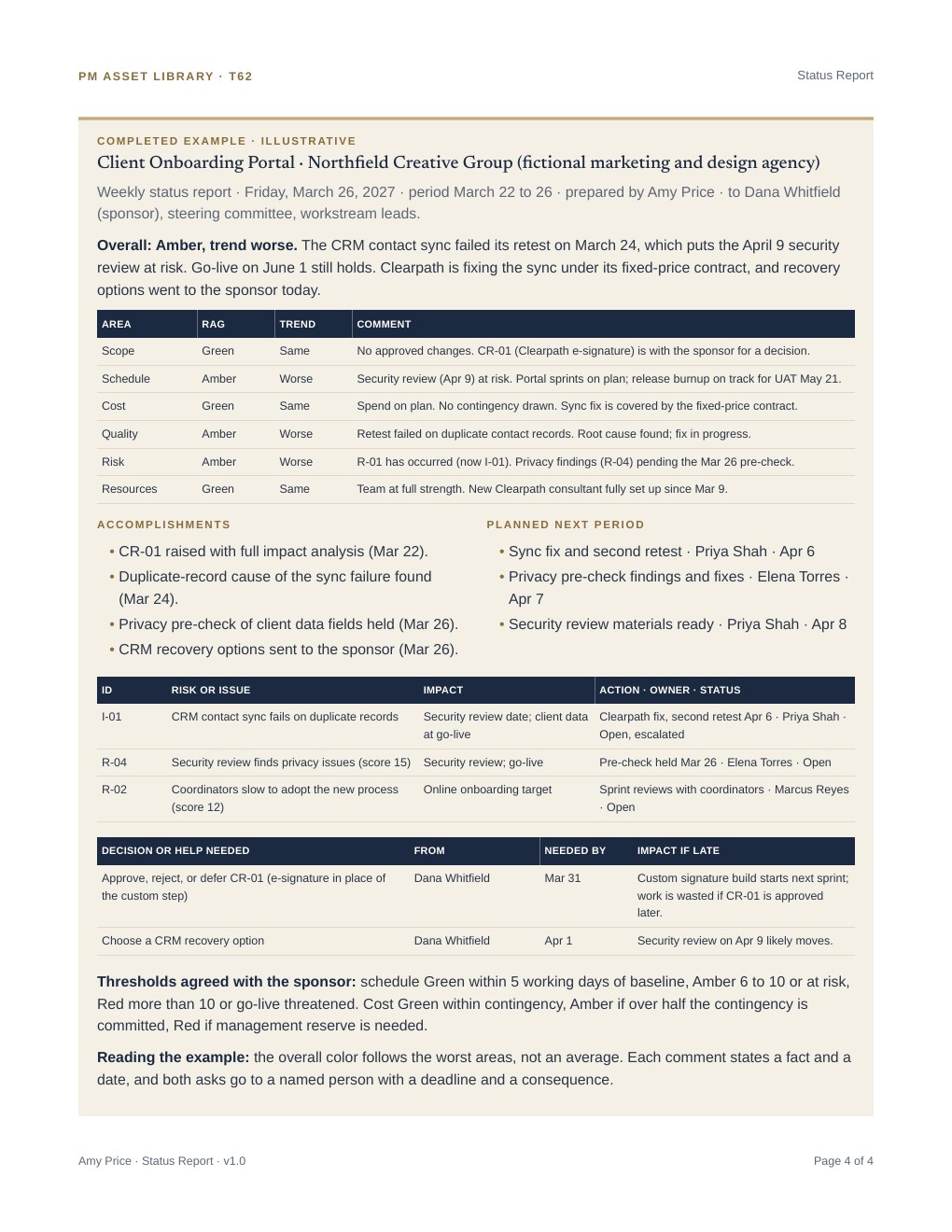
- Risk Register (PDF)Every risk scored, owned, and tracked through its response.
Completed examples use a fictional company, Northfield Creative Group. Names, dates, and figures are illustrative. Designed and directed by me, drafted with AI, and approved by me page by page.
In practice
How I'd use it on a new team
- First 30 days: Learn how projects work today and which tools the team already relies on. Start with the essential kit: charter, stakeholder register, RACI, risk register, status report, and change log.
- Next 60 days: Add standard templates where the team feels pain, such as estimating, quality, or vendor management. Instead of adding paperwork, build them into the systems already in place: as templates and fields in the team's project management software, as steps in existing workflows, or as the blueprint for new ones.
- Ongoing: Fold lessons learned back into the templates, and keep refining the AI workflows built around them as tools improve. The toolkit gets faster and sharper with every project.
Looking ahead
What's next
The toolkit is built to be used, not just read. My next step is to apply it to live projects, starting with the essential kit, and refine each template based on what real teams need. I'll also keep it current as PMI guidance evolves.