Case study 03 · Holt Law
Practical AI adoption in a healthcare legal team
- Scope
- AI workflows for research, drafting, client communication, SOPs, and compliance monitoring
- My role
- Program Manager & Senior Paralegal, leading AI adoption for the legal team
- Team
- Legal assistants, paralegals, and attorneys, plus operations, sales and intake, and leadership
- Timeframe
- Holt Law, 2024 to 2026
- Outcome
- AI built into daily work across every team, with human review at each step
In short
Leadership at Holt Law wanted to work more efficiently, and I was put in charge of AI adoption for the legal team. I started with the work that cost the most to review: research and drafting that moved from legal assistant to paralegal to attorney. Standardized, HIPAA-compliant AI workflows, with human checks at every handoff, meant documents reached attorneys in strong shape. AI became part of everyday work across the firm, from sales and intake to leadership.
The situation
What was at stake
The firm's most time-consuming work was also its least consistent. Customizing client policies, researching requirements for new practice areas, drafting contracts, and writing client emails all varied depending on who did them. Legal assistants weren't always sure where to start, so paralegals and attorneys spent long stretches reviewing and correcting work.
The stakes were high. Our clients work in healthcare, a heavily regulated field, and the policies we drafted governed their organizations. Any AI we used had to protect client health information and produce research we could stand behind.
My role
What I owned
I led AI adoption for the legal team. I researched which tools met HIPAA requirements, leadership made the final approval, and I designed how the team put those tools to work.
Workflows and prompts
I designed standardized prompts for research and drafting that carried each project from legal assistant to paralegal to attorney before it reached the client.
SOPs and templates
I created SOPs for each practice area and email templates for client communication, all in one standard format that made new SOPs much faster to produce.
Client knowledge bases
Each client had a NotebookLM database holding their projects and history. I reviewed each database the legal assistants set up to check that it was accurate and complete, so future work began with the client's full background.
What I did
Key decisions
Start where review cost the most
Research and drafting began with a legal assistant and moved up to a paralegal and then an attorney. Every inconsistency at the first step added review time at each step after it. Attorney time was the firm's most valuable, so standardizing the first step freed attorneys for higher-level work instead of document review.
A prompt for every handoff
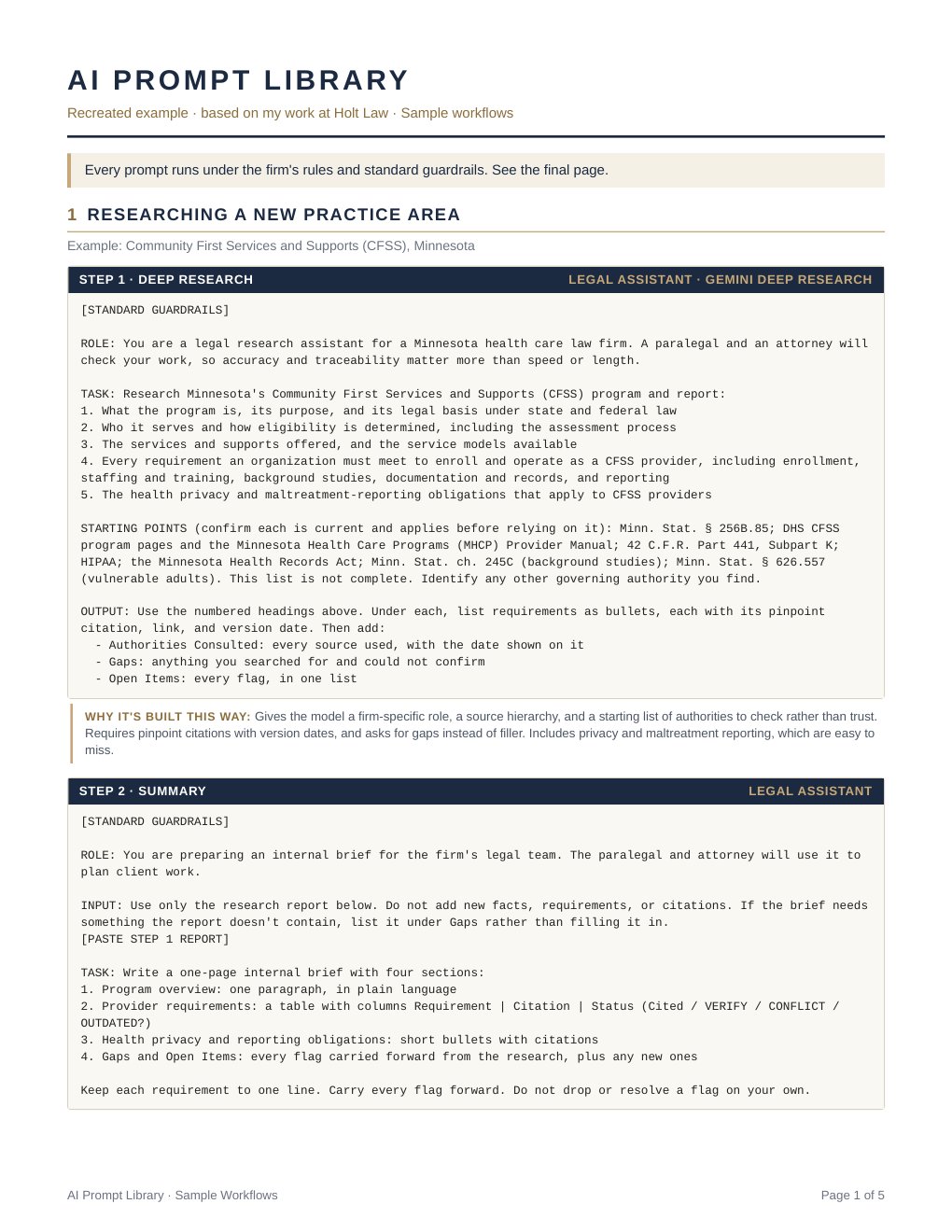
Each workflow included prompts for each role. For an employment agreement, the legal assistant drafted with one prompt, the paralegal reviewed for quality and accuracy with another, and the attorney gave the final review. The same pattern covered researching a new practice area and drafting the full set of policies it required, each one legally sound and comprehensive.
Compliance before convenience
Client work used only business accounts of Gemini and NotebookLM, which leadership approved as HIPAA compliant. Free versions were never used, because they didn't offer the security that client health information requires. Other tools, such as Claude, were tested only on work with no sensitive client information, and every new tool was researched before it entered our workflow.
AI drafts, people decide
Every AI-drafted client message was read in full before it went out. Policies and legal documents were reviewed at each handoff, and every source was verified by hand.
Monitoring regulatory change
Statutes and regulations changed often across our practice areas, and tracking them took significant time for each practice area lead, with the risk of updates slipping through. We set up AI agents to monitor statutes and regulatory websites and flag changes regularly.
Training built into the week
I trained the team through SOPs, weekly demonstrations of AI workflows and tools in our Wednesday L10 meeting, and open morning hours for one-on-one help with me or the operations team.
During rollout
When the plan met reality
The main friction came from hallucinations: AI output that sounded right but wasn't. Instead of scaling back, we strengthened the workflows:
- Refined prompts to produce more reliable research.
- Added workflow steps specifically to check for hallucinations.
- Reinforced that every source in a legal document had to be verified by hand.
Work sample
The prompt library
The outcome
What changed
- Better work at every handoff: Legal assistants produced stronger first drafts, paralegals made minor updates instead of major revisions, and attorneys received high-quality documents that needed only source and fact checking.
- Firm-wide adoption: AI became part of daily work for every team, from sales and intake to operations, legal, and leadership, including inbox organization, meeting summaries, and automatic ClickUp updates.
- Faster, higher-quality work across the client process: The workflows sped up work from onboarding through offboarding and raised the quality of what the team produced.
- A consistent client experience: Standardized templates and communication kept work looking and sounding the same across practice areas.
- A more confident team: Team members took on tasks they weren't comfortable with before and researched answers on their own first. Check-ins became more efficient, and my time shifted to higher-level projects and oversight.
What I'd do differently
Looking back
I'd ask for dedicated time and bandwidth earlier, both for the team to take courses on AI agents and for me to learn more and build automated workflows. Bringing agents in sooner would have significantly increased efficiency on work with no sensitive client information, and taken over routine daily tasks like managing schedules and productivity, freeing more time for client work.